
前回までで、単体のデジタル気圧計の測定データをBLE接続で送信することが出来ました。あまり勉強は進んではいませんが、差圧計を作ることが目的なので、詳しいところは置いておきましょう。少し調べたところだと、前回苦戦したEndiannessはデータを記録する時の順序のことでした。Little Endianeは、下の桁から先に記録して行く、ということのようです。私の理解はすさまじく浅いので解説は先人のサイトに頼ることとして、次に行きましょう。
対の圧力計
これは簡単ですね。前々回作成した気圧計そのままです。
マイコンはXIAO ESP32C3、気圧計はBMP-280を搭載したHW-611 E/P 280です。組み立ては前々回と全く同じですね。違うのは、この対となる気圧計はperipheralとなってLCDの表示を持たないところです。
peripheral / central
通信関係で使われる役割の名称は、似た感じの役割が別の名前になっていて混乱しますね。いろいろ歴史的な背景があるんだとは思いますが、もう少し整理できるとありがたい、というか、新しいものが出たからと言って、全部全部新しい単語を作らなくてもいいのに、とは思います。
| 親機 | 子機 |
| Master | Slave |
| Central | Peripheral |
| Client | Server |
| Gateway | Sensor |
| Observer | Broadcaster |
いろいろ名前がありますが、ClientとServerの関係が普段の感覚と逆ですね。サーバーと聞くと、データを貯めておくところ、というイメージがあります。でも、データを持っていてサーブする方がServerなんですね。だから、温度や気圧のデータを測定して持っている方がServerで、そのデータを必要としている方がClientですね。この解説を読んで、ようやく理解できました。
いろいろ調べているうちに、どのサイトでこの解説を見かけたか分からなくなってしまいました。リンクを貼りたいので、見かけた方は教えてもらえるとありがたいです。
スケッチ
上の区分で行くと、今作っている対の気圧計は、Slaveであり、Peripheralであり、Serverですね。前回作った(単独)デジタル気圧計のスケッチは、Serverとして書かれているので、そのまま使います。
無線デジタル差圧計/bluetooth接続 – しろすけ技術研究所
ただ、対の気圧計にはLCDを付けないので、その部分をざっくり削除してスケッチは以下のようになりました。Serialは動作確認の為残しています。
#include <Wire.h>

#define SDA D4
#define SCL D5

#include <Adafruit_BMP280.h>
Adafruit_BMP280 bmp; // I2C

#include <BLEDevice.h>
#include <BLEUtils.h>
#include <BLEServer.h>

float temp = 0;
float press = 0;

#define SERVICE_UUID "ec55ef5e-****-****-****-************"
#define CHARA_T_UUID "f0254e0e-****-****-****-************"
#define CHARA_P_UUID "cce39fae-****-****-****-************"

BLECharacteristic *tCharacteristic;
BLECharacteristic *pCharacteristic;


void setup() {
  Wire.begin();

  pinMode(SDA, INPUT_PULLUP); //D4 --SDA pin, pullup
  pinMode(SCL, INPUT_PULLUP); //D5 --SCL pin, pullup

  Serial.begin(115200);
  //while ( !Serial ) delay(100);   //←ちょいハマりしたのはコレ
  Serial.println("PI-001 test");

  unsigned status;
  status = bmp.begin(0x76); // I2C address

  if (!status) {
    Serial.println("Could not find a valid BMP280 sensor, check wiring or "
                      "try a different address!");
    Serial.print("SensorID was: 0x"); Serial.println(bmp.sensorID(),16);
    Serial.print("        ID of 0xFF probably means a bad address, a BMP 180 or BMP 085\n");
    Serial.print("   ID of 0x56-0x58 represents a BMP 280,\n");
    Serial.print("        ID of 0x60 represents a BME 280.\n");
    Serial.print("        ID of 0x61 represents a BME 680.\n");
    while (1) delay(10);
  }

  /* Default settings from datasheet. */
  bmp.setSampling(Adafruit_BMP280::MODE_NORMAL,     /* Operating Mode. */
                  Adafruit_BMP280::SAMPLING_X2,     /* Temp. oversampling */
                  Adafruit_BMP280::SAMPLING_X16,    /* Pressure oversampling */
                  Adafruit_BMP280::FILTER_X16,      /* Filtering. */
                  Adafruit_BMP280::STANDBY_MS_500); /* Standby time. */

  BLEDevice::init("PI-001");
  BLEServer *pServer = BLEDevice::createServer();
  BLEService *pService = pServer->createService(SERVICE_UUID);
  tCharacteristic = pService->createCharacteristic(
      CHARA_T_UUID,
      BLECharacteristic::PROPERTY_READ |
      BLECharacteristic::PROPERTY_NOTIFY
  );
  pCharacteristic = pService->createCharacteristic(
      CHARA_P_UUID,
      BLECharacteristic::PROPERTY_READ |
      BLECharacteristic::PROPERTY_NOTIFY
  );

  pService->start();
  BLEAdvertising *pAdvertising = BLEDevice::getAdvertising();
  pAdvertising->addServiceUUID(SERVICE_UUID);
  pAdvertising->setScanResponse(true);
  BLEDevice::startAdvertising();
}

void loop() {

    Serial.print("Temperature = ");
    Serial.print(bmp.readTemperature());
    Serial.println(" *C");

    Serial.print("Pressure = ");
    Serial.print(bmp.readPressure());
    Serial.println(" Pa");

    Serial.println();


    temp = bmp.readTemperature();
    press = bmp.readPressure();

    tCharacteristic->setValue(temp);
    tCharacteristic->notify();
    pCharacteristic->setValue(press);
    pCharacteristic->notify();

    delay(2000);
}
前回分とほぼ同じなので悩む所は無いはずですが、スケッチを描いたPC以外のUSB電源では起動しないというトラブルが発生しました。うーん、どこかで聞いたような。。。
よくよく見てみると、動作確認でPCに繋ぐことがあるので残したSerialが原因でした。
Serial.begin(115200);
while ( !Serial ) delay(100); ←定型文として付いてくるコレ
Serial接続を待つので、接続までdelayがはいっているんですね。別電源のようにSerial接続がない電源で起動した場合は、ここで待機するので、いつまで経ってもBluetooth接続出来ないんですよね。
while ( !Serial ) delay(100);をコメントアウトすることで、どの電源でもBluetooth接続出来るようになりました。
Client
最大の山場がやってきました。いや、BLEに詳しい人からすれば、こんなところは平坦な道そのもので、一体どうやったら躓くのか、と思われることでしょう。。。しかし、エンディアンという単語を2週間前にようやく知ったような素人には、とんでもなく高い山です。
まずは全体像を再確認します。イメージしている無線デジタル差圧計の全体像は下の図の通り。
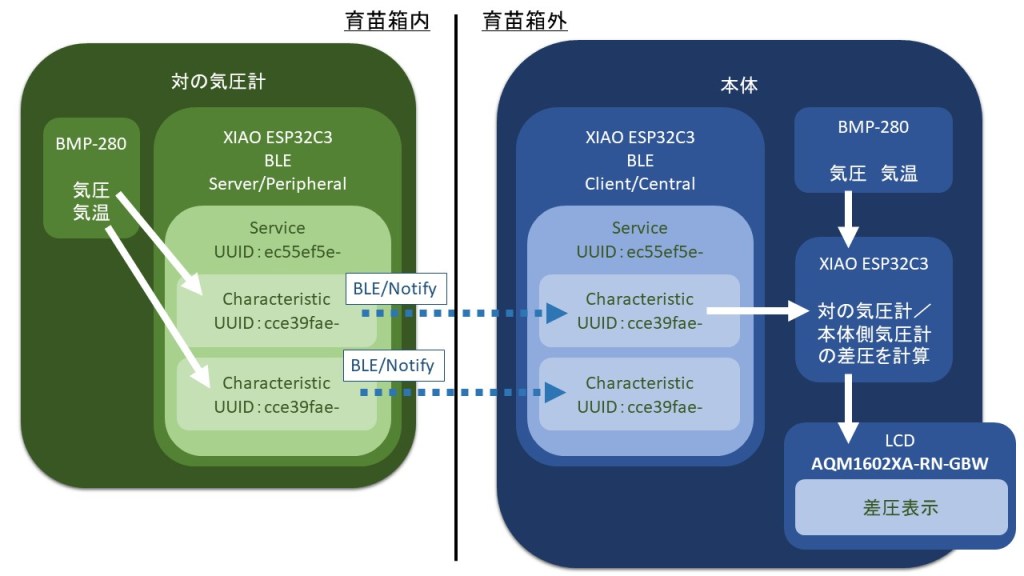
育苗箱内に対の気圧計を置き、気圧データをBLE接続で育苗箱外に置いてある本体に送信。本体は育苗箱外の気圧を測定しているので、BLEで送られてくる育苗箱内の気圧と自分で測定している育苗箱外の気圧データから差圧を計算、本体に設置しているLCDに差圧を表示。温度差は表示しないが、温度データも受け取る。
という形です。
なので、対の気圧計が発信するNotifyをBLE通信で受け取って、実数に変換する必要があります。
なお、BLEのスケッチを理解するのは早々に諦めました。何度も言い訳しますが、差圧計を作るのが目的なので、動きさえすれば中身の理解は後回しです。
スケッチは、esp32のボードをインストールすると付いてくるスケッチ例のBLEにあるClientを使っていきます。
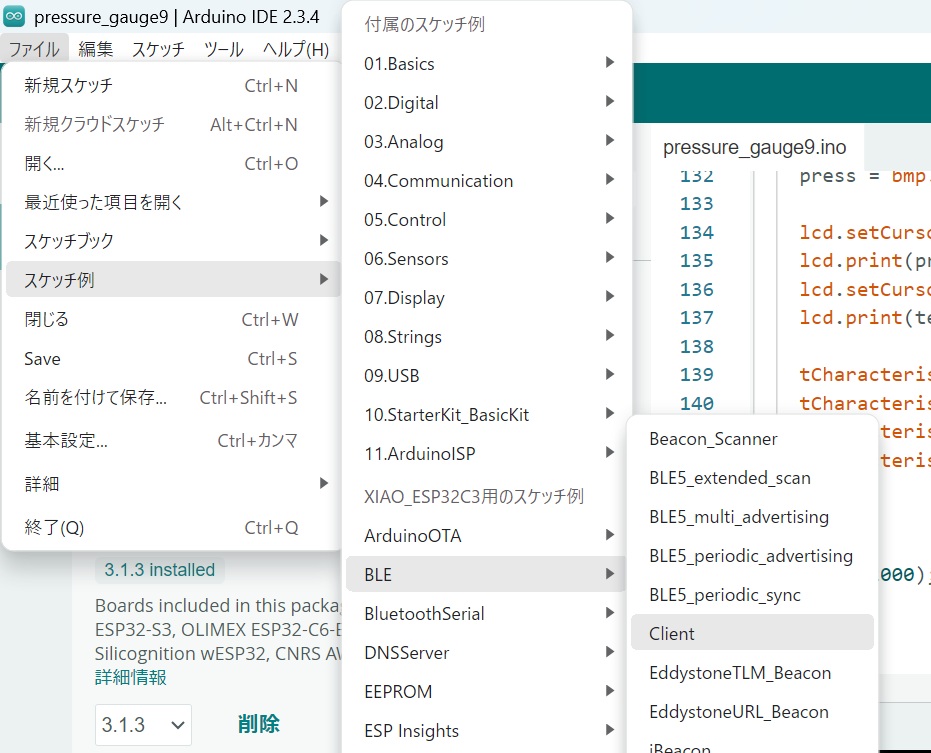
BLEのserviceUUIDとcharacteristicUUIDを書き換えて、そのまま使ってみます。書き換えるのはここですね。上で作った対の気圧計(サーバー)は、気圧と温度をそれぞれのCharacteristicでNotifyしているので、どちらも設定しておきます。気圧のCharacteristicをCHAR_P_UUID、気温をCHAR_T_UUIDとします。
#include "BLEDevice.h"
//#include "BLEScan.h"

// The remote service we wish to connect to.
static BLEUUID serviceUUID("ec55ef5e-****-****-****-************");
// The characteristic of the remote service we are interested in.
static BLEUUID CHAR_P_UUID("cce39fae-****-****-****-************");
static BLEUUID CHAR_T_UUID("f0254e0e-****-****-****-************");
コンパイルしてインストールし、対の気圧計の電源を入れて、本体側のシリアルモニタを確認すると、、、

おお!接続出来ている!
でも、データが文字化けしてるし、圧力のCharacteristicしか表示出来てないですね。
前回の経験から、データが文字化けしているのは、対の圧力計がfloatの圧力データをLittle Endianeで送ってきている為と思われます。これを実数変換して表示する為の変換法は、作りながら学ぶArduino+=電子工作入門さんの以下の記事を参考にして、変換方法を実装します。
初めてのBLE (15) ESP32でペリフェラル③浮動小数点形式 – Arduinoクックブック
理解がまだ追いついていませんが、変換部分をそのまま転用してみます。上の記事の中にある、この部分です。
        uint32_t  data = ((uint8_t)*(ledCharacteristic.value()+3) << 24) + ((uint8_t)*(ledCharacteristic.value()+2) << 16) + ((uint8_t)*(ledCharacteristic.value()+1) << 8)  +  ((uint8_t)*ledCharacteristic.value());
//       Serial.println();Serial.println(data,HEX);
int32_t f = pow(-1, int(bitRead(data,31)));
double k =1 + ((((data<<1)<<8)>>9))/pow(2,23);
int32_t s = pow(2,((((data<<1)>>24))-127));
Serial.println();
Serial.println(f*k*s);
これをサンプルスケッチに組み込みます。32~36行目です。
/**
 * A BLE client example that is rich in capabilities.
 * There is a lot new capabilities implemented.
 * author unknown
 * updated by chegewara
 */

#include "BLEDevice.h"
//#include "BLEScan.h"

// The remote service we wish to connect to.
static BLEUUID serviceUUID("ec55ef5e-cda3-4b7f-ab85-d0f67008ec36");
// The characteristic of the remote service we are interested in.
static BLEUUID CHARA_T_UUID("f0254e0e-f234-4597-967b-0a9a48ddbfba");
static BLEUUID CHARA_P_UUID("cce39fae-547f-4cdf-a460-53bb156f663f");

static boolean doConnect = false;
static boolean connected = false;
static boolean doScan = false;
static BLERemoteCharacteristic *pRemoteCharacteristic;
static BLEAdvertisedDevice *myDevice;

static void notifyCallback(BLERemoteCharacteristic *pBLERemoteCharacteristic, uint8_t *pData, size_t length, bool isNotify) {
  Serial.print("Notify callback for characteristic ");
  Serial.print(pBLERemoteCharacteristic->getUUID().toString().c_str());
  Serial.print(" of data length ");
  Serial.println(length);
  Serial.print("data: ");
  Serial.write(pData, length);
  Serial.println();

  uint32_t press = ((uint8_t)*(pData+3) << 24) + ((uint8_t)*(pData+2) << 16) + ((uint8_t)*(pData+1) << 8)  +  ((uint8_t)*pData);
  int32_t f = pow(-1, int(bitRead(press,31)));
  double k =1 + ((((press<<1)<<8)>>9))/pow(2,23);
  int32_t s = pow(2,((((press<<1)>>24))-127));
  Serial.println(f*k*s);

}

class MyClientCallback : public BLEClientCallbacks {
  void onConnect(BLEClient *pclient) {}

  void onDisconnect(BLEClient *pclient) {
    connected = false;
    Serial.println("onDisconnect");
  }
};

bool connectToServer() {
  Serial.print("Forming a connection to ");
  Serial.println(myDevice->getAddress().toString().c_str());

  BLEClient *pClient = BLEDevice::createClient();
  Serial.println(" - Created client");

  pClient->setClientCallbacks(new MyClientCallback());

  // Connect to the remove BLE Server.
  pClient->connect(myDevice);  // if you pass BLEAdvertisedDevice instead of address, it will be recognized type of peer device address (public or private)
  Serial.println(" - Connected to server");
  pClient->setMTU(517);  //set client to request maximum MTU from server (default is 23 otherwise)

  // Obtain a reference to the service we are after in the remote BLE server.
  BLERemoteService *pRemoteService = pClient->getService(serviceUUID);
  if (pRemoteService == nullptr) {
    Serial.print("Failed to find our service UUID: ");
    Serial.println(serviceUUID.toString().c_str());
    pClient->disconnect();
    return false;
  }
  Serial.println(" - Found our service");

  // Obtain a reference to the characteristic in the service of the remote BLE server.
  pRemoteCharacteristic = pRemoteService->getCharacteristic(CHARA_P_UUID);
  if (pRemoteCharacteristic == nullptr) {
    Serial.print("Failed to find our characteristic UUID: ");
    Serial.println(CHARA_P_UUID.toString().c_str());
    pClient->disconnect();
    return false;
  }
  Serial.println(" - Found our characteristic");

  // Read the value of the characteristic.
  if (pRemoteCharacteristic->canRead()) {
    String value = pRemoteCharacteristic->readValue();
    Serial.print("The characteristic value was: ");
    Serial.println(value.c_str());
  }

  if (pRemoteCharacteristic->canNotify()) {
    pRemoteCharacteristic->registerForNotify(notifyCallback);
  }

  connected = true;
  return true;
}
/**
 * Scan for BLE servers and find the first one that advertises the service we are looking for.
 */
class MyAdvertisedDeviceCallbacks : public BLEAdvertisedDeviceCallbacks {
  /**
   * Called for each advertising BLE server.
   */
  void onResult(BLEAdvertisedDevice advertisedDevice) {
    Serial.print("BLE Advertised Device found: ");
    Serial.println(advertisedDevice.toString().c_str());

    // We have found a device, let us now see if it contains the service we are looking for.
    if (advertisedDevice.haveServiceUUID() && advertisedDevice.isAdvertisingService(serviceUUID)) {

      BLEDevice::getScan()->stop();
      myDevice = new BLEAdvertisedDevice(advertisedDevice);
      doConnect = true;
      doScan = true;

    }  // Found our server
  }  // onResult
};  // MyAdvertisedDeviceCallbacks

void setup() {
  Serial.begin(115200);
  Serial.println("Starting Arduino BLE Client application...");
  BLEDevice::init("");

  // Retrieve a Scanner and set the callback we want to use to be informed when we
  // have detected a new device.  Specify that we want active scanning and start the
  // scan to run for 5 seconds.
  BLEScan *pBLEScan = BLEDevice::getScan();
  pBLEScan->setAdvertisedDeviceCallbacks(new MyAdvertisedDeviceCallbacks());
  pBLEScan->setInterval(1349);
  pBLEScan->setWindow(449);
  pBLEScan->setActiveScan(true);
  pBLEScan->start(5, false);
}  // End of setup.

// This is the Arduino main loop function.
void loop() {

  // If the flag "doConnect" is true then we have scanned for and found the desired
  // BLE Server with which we wish to connect.  Now we connect to it.  Once we are
  // connected we set the connected flag to be true.
  if (doConnect == true) {
    if (connectToServer()) {
      Serial.println("We are now connected to the BLE Server.");
    } else {
      Serial.println("We have failed to connect to the server; there is nothing more we will do.");
    }
    doConnect = false;
  }

  // If we are connected to a peer BLE Server, update the characteristic each time we are reached
  // with the current time since boot.
  if (connected) {
    String newValue = "Time since boot: " + String(millis() / 1000);
    Serial.println("Setting new characteristic value to \"" + newValue + "\"");

    // Set the characteristic's value to be the array of bytes that is actually a string.
    pRemoteCharacteristic->writeValue(newValue.c_str(), newValue.length());
  } else if (doScan) {
    BLEDevice::getScan()->start(0);  // this is just example to start scan after disconnect, most likely there is better way to do it in arduino
  }

  delay(1000);  // Delay a second between loops.
}  // End of loop
これをコンパイルして、対の気圧計を立ち上げ、本体側のシリアルモニタを確認すると、、、
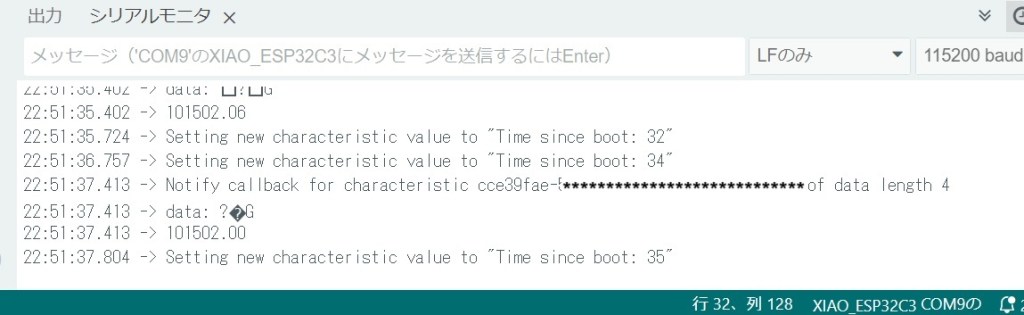
おお!Pa単位の気圧値”101502.00″が見えた!
元々あるdata:のところは文字化けしたままですが、余計な所は削って行けばいいので、とりあえず、対の気圧計がNotifyで発信する圧力データをBLE接続で受け取って実数に変換することが出来ました。
複数のCharacteristic
同じService内で別のCharacteristicでNotifyしている温度データを、気圧データと同時に読み取ることが出来ていません。
いくつかのサイトを参考に、いろいろ試してみましたが、なかなかうまくいきません。Clientの設定を温度データのCharacteristicだけにすると、ちゃんと温度データは表示出来るので対の気圧計の温度データのNotifyがうまくいっていない訳ではないですね。
というわけで、どうしようもなさそうなので、Aiに頼ることにしました。CopilotとGeminiの両方を試しましたが、白紙から作るとどちらもcompile errorが出てしまって先に進めませんでした。まあ、質問文が、
”esp32を使ったBLE接続で複数のキャラクタリステックを持つクライアントのスケッチをArduinoIDEで作って”
というざっくり感たっぷりのものだったので、仕方ないかもしれません。
代わりに、先ほどのサンプルスケッチにfloat/little endianeの実数変換を追加したスケッチを、2個のキャラクタリスティックに対応するよう改造してもらうことにしました。
Geminiに
esp32を使ってBLE接続をするクライアントのスケッチをArduinoIDEで作った。これを二個のキャラクタリスティックを読めるように改造したいけど、どうしたらいい?
という質問文の下に、先ほどのスケッチを付けて聞いてみたところ、下の回答をくれました。
はい、ESP32でBLEクライアントを作成し、2つのキャラクタリスティックを読み取るように改造する方法を説明します。
現在のスケッチでは、CHARA_P_UUIDという1つのキャラクタリスティックのみを処理しています。もう1つのキャラクタリスティックCHARA_T_UUIDも同様に処理するために、以下の手順でスケッチを修正します。
1. 必要な変更点:
- 2つ目のキャラクタリスティックのポインタを追加: pRemoteCharacteristicと同様に、pRemoteCharacteristic2などのポインタを追加して2つ目のキャラクタリスティックを保持します。
- 2つ目のキャラクタリスティックの取得と処理: connectToServer()関数内で、2つ目のキャラクタリスティックを取得し、読み取りや通知登録を行います。
- 2つのキャラクタリスティックの通知コールバック処理: 2つのキャラクタリスティックからの通知を区別し、適切に処理するようにnotifyCallback()関数を修正します。
修正後のスケッチ:
C++
/**
* A BLE client example that is rich in capabilities.
* There is a lot new capabilities implemented.
* author unknown
* updated by chegewara
*/
#include “BLEDevice.h”
//#include “BLEScan.h”
// The remote service we wish to connect to.
static BLEUUID serviceUUID(“ec55ef5e-cda3-4b7f-ab85-d0f67008ec36”);
// The characteristic of the remote service we are interested in.
static BLEUUID CHARA_T_UUID(“f0254e0e-f234-4597-967b-0a9a48ddbfba”);
static BLEUUID CHARA_P_UUID(“cce39fae-547f-4cdf-a460-53bb156f663f”);
static boolean doConnect = false;
static boolean connected = false;
static boolean doScan = false;
static BLERemoteCharacteristic *pRemoteCharacteristic;
static BLERemoteCharacteristic *pRemoteCharacteristic2; // 2つ目のキャラクタリスティックのポインタ
static BLEAdvertisedDevice *myDevice;
static void notifyCallback(BLERemoteCharacteristic *pBLERemoteCharacteristic, uint8_t *pData, size_t length, bool isNotify) {
Serial.print(“Notify callback for characteristic “);
Serial.print(pBLERemoteCharacteristic->getUUID().toString().c_str());
Serial.print(” of data length “);
Serial.println(length);
Serial.print(“data: “);
Serial.write(pData, length);
Serial.println();
if (pBLERemoteCharacteristic->getUUID() == CHARA_P_UUID) {
// CHARA_P_UUIDの処理
uint32_t press = ((uint8_t) * (pData + 3) << 24) + ((uint8_t) * (pData + 2) << 16) + ((uint8_t) * (pData + 1) << 8) + ((uint8_t) * pData);
int32_t f = pow(-1, int(bitRead(press, 31)));
double k = 1 + ((((press << 1) << 8) >> 9)) / pow(2, 23);
int32_t s = pow(2, ((((press << 1) >> 24)) – 127));
Serial.println(f * k * s);
} else if (pBLERemoteCharacteristic->getUUID() == CHARA_T_UUID) {
// CHARA_T_UUIDの処理
// ここにCHARA_T_UUIDのデータを処理するコードを追加
Serial.println(“CHARA_T_UUID data received”);
//例えば受け取ったデータをそのまま表示する場合
for (int i=0; i<length; i++){
Serial.print(pData[i], HEX);
Serial.print(” “);
}
Serial.println();
}
}
class MyClientCallback : public BLEClientCallbacks {
void onConnect(BLEClient *pclient) {}
void onDisconnect(BLEClient *pclient) {
connected = false;
Serial.println(“onDisconnect”);
}
};
bool connectToServer() {
Serial.print(“Forming a connection to “);
Serial.println(myDevice->getAddress().toString().c_str());
BLEClient *pClient = BLEDevice::createClient();
Serial.println(” – Created client”);
pClient->setClientCallbacks(new MyClientCallback());
// Connect to the remove BLE Server.
pClient->connect(myDevice); // if you pass BLEAdvertisedDevice instead of address, it will be recognized type of peer device address (public or private)
Serial.println(” – Connected to server”);
pClient->setMTU(517); //set client to request maximum MTU from server (default is 23 otherwise)
// Obtain a reference to the service we are after in the remote BLE server.
BLERemoteService *pRemoteService = pClient->getService(serviceUUID);
if (pRemoteService == nullptr) {
Serial.print(“Failed to find our service UUID: “);
Serial.println(serviceUUID.toString().c_str());
pClient->disconnect();
return false;
}
Serial.println(” – Found our service”);
// Obtain a reference to the characteristic in the service of the remote BLE server.
pRemoteCharacteristic = pRemoteService->getCharacteristic(CHARA_P_UUID);
if (pRemoteCharacteristic == nullptr) {
Serial.print(“Failed to find our characteristic UUID: “);
Serial.println(CHARA_P_UUID.toString().c_str());
pClient->disconnect();
return false;
}
Serial.println(” – Found our characteristic CHARA_P_UUID”);
// Read the value of the characteristic.
if (pRemoteCharacteristic->canRead()) {
String value = pRemoteCharacteristic->readValue();
Serial.print(“The characteristic value was: “);
Serial.println(value.c_str());
}
if (pRemoteCharacteristic->canNotify()) {
pRemoteCharacteristic->registerForNotify(notifyCallback);
}
// 2つ目のキャラクタリスティックの取得と処理
pRemoteCharacteristic2 = pRemoteService->getCharacteristic(CHARA_T_UUID);
if (pRemoteCharacteristic2 == nullptr) {
Serial.print(“Failed to find our characteristic UUID: “);
Serial.println(CHARA_T_UUID.toString().c_str());
pClient->disconnect();
return false;
}
Serial.println(” – Found our characteristic CHARA_T_UUID”);
// Read the value of the characteristic.
if (pRemoteCharacteristic2->canRead()) {
String value = pRemoteCharacteristic2->readValue();
Serial.print(“The characteristic value was: “);
Serial.println(value.c_str());
}
if (pRemoteCharacteristic2->canNotify()) {
pRemoteCharacteristic2->registerForNotify(notifyCallback);
}
connected = true;
return true;
}
/**
* Scan for BLE servers and find the first one that advertises the service we are looking for.
*/
class MyAdvertisedDeviceCallbacks : public BLEAdvertisedDeviceCallbacks {
/**
* Called for each advertising BLE server.
*/
void onResult(BLEAdvertisedDevice advertisedDevice) {
Serial.print(“BLE Advertised Device found: “);
Serial.println(advertisedDevice.toString().c_str());
// We have found a device, let us now see if it contains the service we are looking for.
if (advertisedDevice.haveServiceUUID() && advertisedDevice.isAdvertisingService(serviceUUID)) {
BLEDevice::getScan()->stop();
myDevice = new BLEAdvertisedDevice(advertisedDevice);
doConnect = true;
doScan = true;
} // Found our server
} // onResult
}; // MyAdvertisedDeviceCallbacks
void setup() {
Serial.begin(115200);
Serial.println(“Starting Arduino BLE Client application…”);
BLEDevice::init(“”);
// Retrieve a Scanner and set the callback we want to use to be informed when we
// have detected a new device. Specify that we want active scanning and start the
// scan to run for 5 seconds.
BLEScan *pBLEScan = BLEDevice::getScan();
pBLEScan->setAdvertisedDeviceCallbacks(new MyAdvertisedDeviceCallbacks());
pBLEScan->setInterval(1349);
pBLE
Geminiの修正スケッチをそっくりそのままコンパイルすると、エラーが出ました。
Compilation error: extended character is not valid in an identifier
エラーメッセージを、Geminiのさっきの回答の後に貼って送ると、再度修正案をくれました。内容は以下の通り。
エラーメッセージから、以下の3つの問題が発生していることがわかります。
- BLEUUIDの比較エラー: notifyCallback()関数内で、BLEUUIDオブジェクトを==演算子で直接比較しようとしていますが、BLEUUIDクラスにはそのような演算子が定義されていません。
- pBLEの未宣言エラー: setup()関数内で、pBLEという変数が宣言されずに使用されています。
- setup()関数の閉じ括弧の欠落: setup()関数の最後に閉じ括弧}がありません。
修正方法:
- BLEUUIDの比較: BLEUUIDオブジェクトを比較するには、operator==ではなく、getUUID().equals()メソッドを使用する必要があります。
- pBLEの削除: スケッチ内でpBLEは未使用なので削除します。
- setup()関数の閉じ括弧の追加: setup()関数の最後に閉じ括弧}を追加します。
修正後のnotifyCallback()関数: →省略
修正後のスケッチをそのままコンパイルすると、別のエラーが出ました。同様にエラーメッセージをGeminiに投げると、下の回答がありました。
このエラーメッセージは、コンパイラがloop()関数を見つけられないことを示しています。Arduino IDEでスケッチをコンパイルするとき、コンパイラはsetup()関数とloop()関数が定義されていることを期待します。
問題は、あなたのスケッチにloop()関数の定義がないことです。以前の修正でloop()関数を削除してしまった可能性があります。
解決策:
以前のスケッチからloop()関数を復元するか、または新しいloop()関数をスケッチに追加する必要があります。
以下に、以前のスケッチから復元されたloop()関数を示します。これをあなたのスケッチに追加してください。
Geminiの再々修正案をコンパイルすると、、、
通った!
余計な所を削除、識別しやすいようにデータの名前と単位のSerial表示を追加してコンパイル、対の気圧計と接続して、本体側のシリアルモニタを確認すると

おおおおお!できた!!
1Pは対の気圧計の気圧データ、1Tは対の気圧計の温度データです。
C+/C++のポインタとか全く勉強できていませんが、AI(Gemini)におんぶにだっこで、作りたかったものが出来ました。ちょっと感動。すごいですねAI。
一発で正解が出なくて、何度かエラーメッセージを伝えて修正してを繰り返すところが、人間に近づいた気がします。昔だったら同じ回答しか返さなかったんじゃなかったかな。
ここまで行けば、後は難しくないはず。本体側の気圧データと差分を取って、LCDへ表示することと、ゼロ点調整の仕組みを組み込めば、設計は完成ですね。あまりに長くなってしまったので、今回はここまで。
次は差圧計算とゼロ点調整ですね。
長くなりますが、再々修正後のスケッチを下に貼っておきます。
#include "BLEDevice.h"

// The remote service we wish to connect to.
static BLEUUID serviceUUID("ec55ef5e-cda3-4b7f-ab85-d0f67008ec36");
// The characteristic of the remote service we are interested in.
static BLEUUID CHARA_T_UUID("f0254e0e-f234-4597-967b-0a9a48ddbfba");
static BLEUUID CHARA_P_UUID("cce39fae-547f-4cdf-a460-53bb156f663f");

static boolean doConnect = false;
static boolean connected = false;
static boolean doScan = false;
static BLERemoteCharacteristic *pRemoteCharacteristic_P;
static BLERemoteCharacteristic *pRemoteCharacteristic_T; // 2つ目のキャラクタリスティックのポインタ
static BLEAdvertisedDevice *myDevice;

static void notifyCallback(BLERemoteCharacteristic *pBLERemoteCharacteristic, uint8_t *pData, size_t length, bool isNotify) {
if (pBLERemoteCharacteristic->getUUID().equals(CHARA_P_UUID)) { // equals()を使用
    // CHARA_P_UUIDの処理
    uint32_t press = ((uint8_t) * (pData + 3) << 24) + ((uint8_t) * (pData + 2) << 16) + ((uint8_t) * (pData + 1) << 8) + ((uint8_t) * pData);
    int32_t f_P = pow(-1, int(bitRead(press, 31)));
    double k_P = 1 + ((((press << 1) << 8) >> 9)) / pow(2, 23);
    int32_t s_P = pow(2, ((((press << 1) >> 24)) - 127));
    float PRESS = f_P * k_P * s_P;
    Serial.print("1P: ");
    Serial.print(PRESS);
    Serial.println(" Pa");
    Serial.println();

  } else if (pBLERemoteCharacteristic->getUUID().equals(CHARA_T_UUID)) { // equals()を使用
    // CHARA_T_UUIDの処理
    uint32_t temp = ((uint8_t) * (pData + 3) << 24) + ((uint8_t) * (pData + 2) << 16) + ((uint8_t) * (pData + 1) << 8) + ((uint8_t) * pData);
    int32_t f_T = pow(-1, int(bitRead(temp, 31)));
    double k_T = 1 + ((((temp << 1) << 8) >> 9)) / pow(2, 23);
    int32_t s_T = pow(2, ((((temp << 1) >> 24)) - 127));
    float TEMP = f_T * k_T * s_T;
    Serial.print("1T: ");
    Serial.print(TEMP);
    Serial.println(" ℃");
    }
}

class MyClientCallback : public BLEClientCallbacks {
  void onConnect(BLEClient *pclient) {}

  void onDisconnect(BLEClient *pclient) {
    connected = false;
    Serial.println("onDisconnect");
  }
};

bool connectToServer() {
  Serial.print("Forming a connection to ");
  Serial.println(myDevice->getAddress().toString().c_str());

  BLEClient *pClient = BLEDevice::createClient();
  Serial.println(" - Created client");

  pClient->setClientCallbacks(new MyClientCallback());

  // Connect to the remove BLE Server.
  pClient->connect(myDevice);  // if you pass BLEAdvertisedDevice instead of address, it will be recognized type of peer device address (public or private)
  Serial.println(" - Connected to server");
  pClient->setMTU(517);  //set client to request maximum MTU from server (default is 23 otherwise)

  // Obtain a reference to the service we are after in the remote BLE server.
  BLERemoteService *pRemoteService = pClient->getService(serviceUUID);
  if (pRemoteService == nullptr) {
    Serial.print("Failed to find our service UUID: ");
    Serial.println(serviceUUID.toString().c_str());
    pClient->disconnect();
    return false;
  }
  Serial.println(" - Found our service");

  // Obtain a reference to the characteristic in the service of the remote BLE server.
  pRemoteCharacteristic_P = pRemoteService->getCharacteristic(CHARA_P_UUID);
  if (pRemoteCharacteristic_P == nullptr) {
    Serial.print("Failed to find our characteristic UUID: ");
    Serial.println(CHARA_P_UUID.toString().c_str());
    pClient->disconnect();
    return false;
  }
  Serial.println(" - Found our characteristic CHARA_P_UUID");

  // Read the value of the characteristic.
  if (pRemoteCharacteristic_P->canRead()) {
    String value = pRemoteCharacteristic_P->readValue();
    Serial.print("The characteristic value was: ");
    Serial.println(value.c_str());
  }

  if (pRemoteCharacteristic_P->canNotify()) {
    pRemoteCharacteristic_P->registerForNotify(notifyCallback);
  }

  // 2つ目のキャラクタリスティックの取得と処理
  pRemoteCharacteristic_T = pRemoteService->getCharacteristic(CHARA_T_UUID);
  if (pRemoteCharacteristic_T == nullptr) {
    Serial.print("Failed to find our characteristic UUID: ");
    Serial.println(CHARA_T_UUID.toString().c_str());
    pClient->disconnect();
    return false;
  }
  Serial.println(" - Found our characteristic CHARA_T_UUID");

  // Read the value of the characteristic.
  if (pRemoteCharacteristic_T->canRead()) {
    String value = pRemoteCharacteristic_T->readValue();
    Serial.print("The characteristic value was: ");
    Serial.println(value.c_str());
  }

  if (pRemoteCharacteristic_T->canNotify()) {
    pRemoteCharacteristic_T->registerForNotify(notifyCallback);
  }

  connected = true;
  return true;
}

/**
 * Scan for BLE servers and find the first one that advertises the service we are looking for.
 */
class MyAdvertisedDeviceCallbacks : public BLEAdvertisedDeviceCallbacks {
  /**
   * Called for each advertising BLE server.
   */
  void onResult(BLEAdvertisedDevice advertisedDevice) {
    Serial.print("BLE Advertised Device found: ");
    Serial.println(advertisedDevice.toString().c_str());

    // We have found a device, let us now see if it contains the service we are looking for.
    if (advertisedDevice.haveServiceUUID() && advertisedDevice.isAdvertisingService(serviceUUID)) {

      BLEDevice::getScan()->stop();
      myDevice = new BLEAdvertisedDevice(advertisedDevice);
      doConnect = true;
      doScan = true;

    }  // Found our server
  }  // onResult
};  // MyAdvertisedDeviceCallbacks

void setup() {
  Serial.begin(115200);
  Serial.println("Starting Arduino BLE Client application...");
  BLEDevice::init("");

  // Retrieve a Scanner and set the callback we want to use to be informed when we
  // have detected a new device.  Specify that we want active scanning and start the
  // scan to run for 5 seconds.
  BLEScan *pBLEScan = BLEDevice::getScan();
  pBLEScan->setAdvertisedDeviceCallbacks(new MyAdvertisedDeviceCallbacks());
  pBLEScan->setInterval(1349);
  pBLEScan->setWindow(449);
  pBLEScan->setActiveScan(true);
  pBLEScan->start(5, false);
} // 閉じ括弧を追加

void loop() {

  // If the flag "doConnect" is true then we have scanned for and found the desired
  // BLE Server with which we wish to connect.  Now we connect to it.  Once we are
  // connected we set the connected flag to be true.
  if (doConnect == true) {
    if (connectToServer()) {
      Serial.println("We are now connected to the BLE Server.");
    } else {
      Serial.println("We have failed to connect to the server; there is nothing more we will do.");
    }
    doConnect = false;
  }

  // If we are connected to a peer BLE Server, update the characteristic each time we are reached
  // with the current time since boot.
  if (connected) {
    /*
    String newValue = "Time since boot: " + String(millis() / 1000);
    Serial.println("Setting new characteristic value to \"" + newValue + "\"");
    */

    // Set the characteristic's value to be the array of bytes that is actually a string.
    //pRemoteCharacteristic->writeValue(newValue.c_str(), newValue.length());
  } else if (doScan) {
    BLEDevice::getScan()->start(0);  // this is just example to start scan after disconnect, most likely there is better way to do it in arduino
  }

  delay(1000);  // Delay a second between loops.
}  // End of loop




コメントを残す